> ## Documentation Index
> Fetch the complete documentation index at: https://docs.resurs.com/llms.txt
> Use this file to discover all available pages before exploring further.
# Price Info
> Display payment plans, monthly costs, and credit details on your product pages using Resurs Price Info.
This feature is still in testing, with full release planned for Q3 2026. Some
things may not work exactly as expected yet.
Interested in using it? [Get in touch](https://www.resursbank.se/) to learn
more — and if you already use Resurs Merchant API or another checkout
service, reach out so we can make sure your setup works well together.
## Intro
Resurs Price Info is a compliant way to let your customers understand our terms,
explore payment plans, monthly costs, interest rates, total credit, and other
costs directly in your storefront. It will display a call-to-action to apply for
the given payment method if an application form is configured. Embed it as an
iframe or link to our hosted page.
[Live demo](https://pricing.resurs.com/stores/7a38d7b8-e530-423b-b57e-8f21a6d35a8d/channels/ECOMMERCE/payment-methods/2a77c1b2-5f15-48d8-bf01-84dce80a541f?amount=50000\&customerType=NATURAL)
## Use Cases
### Embedded in your page
Display Resurs price info directly in your page using an `
```
See the [URL Parameters](#url-parameters) section for details on all available
parameters.
#### Checkout Mode
You can embed a checkout-tailored variant of the price info page. In checkout
mode, the purchase amount is fixed (no amount slider is shown), making it
suitable for order confirmation, or embedding in your checkout, where the amount
is already determined.
Example:
```html theme={"theme":{"light":"catppuccin-latte","dark":"one-dark-pro"}}
```
See the [URL Parameters](#url-parameters) section for details on all available
parameters.
#### Product Detail Page (PDP) Mode
You can embed a pdp-tailored variant of the price info page. In PDP mode, the
purchase amount is fixed (no amount slider is shown), making it suitable for
embedding in your product pages, where the amount matches your product price.
Example:
```html theme={"theme":{"light":"catppuccin-latte","dark":"one-dark-pro"}}
```
See the [URL Parameters](#url-parameters) section for details on all available
parameters.
### Link to us
You can add a link to our hosted price info page so customers can view pricing
in a page hosted by us.
Example:
```html theme={"theme":{"light":"catppuccin-latte","dark":"one-dark-pro"}}
View payment options
```
See the [URL Parameters](#url-parameters) section for details on all available
parameters.
## Constructing the URL
A price info URL consists of a base URL, mode (optional), store ID, channel
type, payment method ID, amount, customer type, repayment months (optional), and
interest rate (optional).
### URL Parameters
Breaking down this example:
`https://pricing.resurs.com/[mode]/stores/[store-id]/channels/[channleType]/payment-methods/[paymentMethodId]?amount=[amount]&customerType=[customerType]&repaymentMonths=[repaymentMonths]&interestRate=[interestRate]`
#### Positional Parameters
| Parameter | Description | Required |
| ----------------- | ------------------------------------------------------------------ | -------- |
| `mode` | Optional mode. If present, valid modes include: `checkout`, `pdp`. | No |
| `storeId` | Your unique store identifier. | **Yes** |
| `channelType` | The sales channel (see [Channel Types](#channel-types)). | **Yes** |
| `paymentMethodId` | Unique payment method identifier. | **Yes** |
#### Query Parameters
| Parameter | Description | Required |
| ----------------- | ----------------------------------------------------------------------------------------------------- | -------- |
| `amount` | Purchase amount as a plain number (e.g., 123 or 123.45). No thousands separators or currency symbols. | **Yes** |
| `customerType` | `NATURAL` for consumers (B2C) or `LEGAL` for businesses (B2B). Defaults to `NATURAL`. | No |
| `repaymentMonths` | Number of repayment months. | No |
| `interestRate` | Interest rate. | No |
### Channel Types
| Value | Description |
| --------------------- | --------------------------- |
| `ECOMMERCE` | Standard e-commerce webshop |
| `MERCHANT_PORTAL` | Merchant portal |
| `MERCHANT_API` | Merchant API (MAPI) |
| `ONLINE_APPLICATIONS` | Apply Retail Credit |
### Customer Types
| Value | Description |
| --------- | --------------------------- |
| `NATURAL` | Individual / consumer (B2C) |
| `LEGAL` | Business / company (B2B) |
## What the Page Displays
### Default Mode
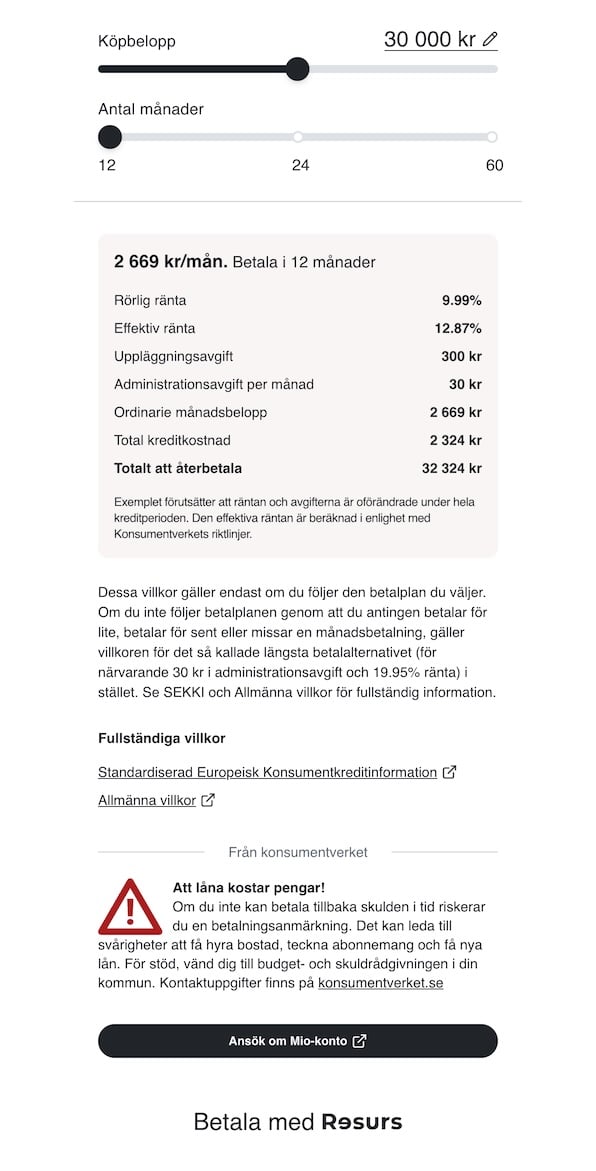 The default pricing page shows:
* **Amount slider** — adjustable purchase amount within the payment method’s min/max limits
* **Amount input** — enter an exact purchase amount directly instead of using the slider
* **Duration selector** — choose repayment period from available options (number of months for credit products, number of days for invoice)
* **Price breakdown** — depending on the payment method, shows:
* Monthly repayment amount
* Interest rate and effective interest rate
* Monthly administration fee
* Arrangement fee
* Total credit cost and total loan cost
* For invoices: account fee and payment timeframe
* **Campaign badges** — promotional payment plans are highlighted
* **Legal links** — links to SECCI (standardised European consumer credit information) and general terms
* **Credit warning** — for Swedish stores, a mandatory consumer credit warning is displayed when appropriate
* **Apply link** — if available, a call-to-action button to apply for the payment method
### Checkout Mode
The default pricing page shows:
* **Amount slider** — adjustable purchase amount within the payment method’s min/max limits
* **Amount input** — enter an exact purchase amount directly instead of using the slider
* **Duration selector** — choose repayment period from available options (number of months for credit products, number of days for invoice)
* **Price breakdown** — depending on the payment method, shows:
* Monthly repayment amount
* Interest rate and effective interest rate
* Monthly administration fee
* Arrangement fee
* Total credit cost and total loan cost
* For invoices: account fee and payment timeframe
* **Campaign badges** — promotional payment plans are highlighted
* **Legal links** — links to SECCI (standardised European consumer credit information) and general terms
* **Credit warning** — for Swedish stores, a mandatory consumer credit warning is displayed when appropriate
* **Apply link** — if available, a call-to-action button to apply for the payment method
### Checkout Mode
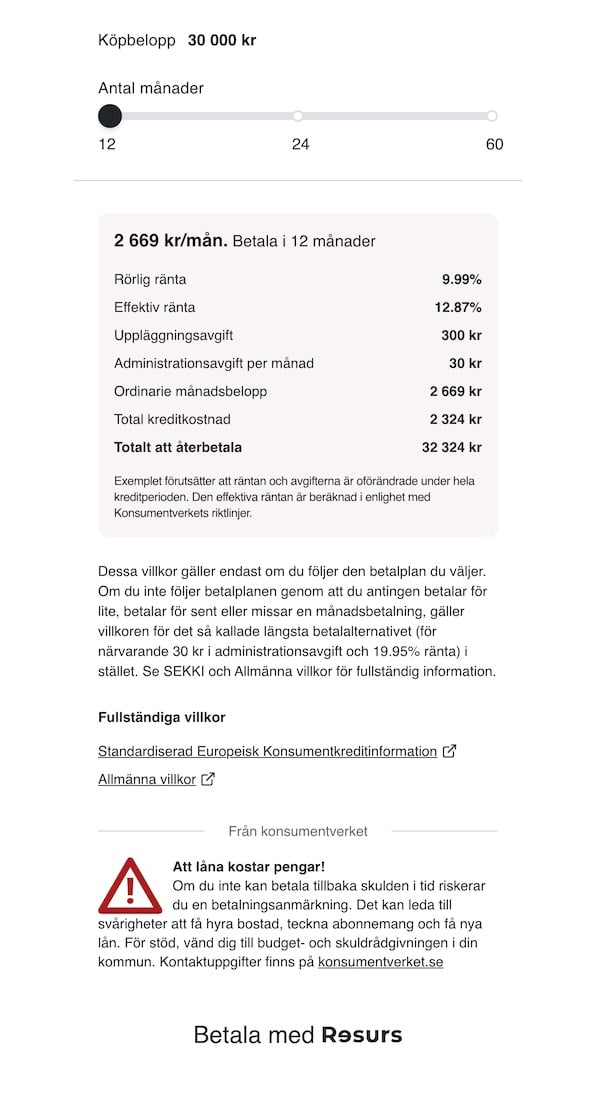 The checkout view shows the same pricing information but with a **fixed amount**
— the amount slider is hidden since the purchase amount is already
determined at checkout — and no link to apply for the payment method (in
cases where we would display this link by default).
### PDP Mode
The checkout view shows the same pricing information but with a **fixed amount**
— the amount slider is hidden since the purchase amount is already
determined at checkout — and no link to apply for the payment method (in
cases where we would display this link by default).
### PDP Mode
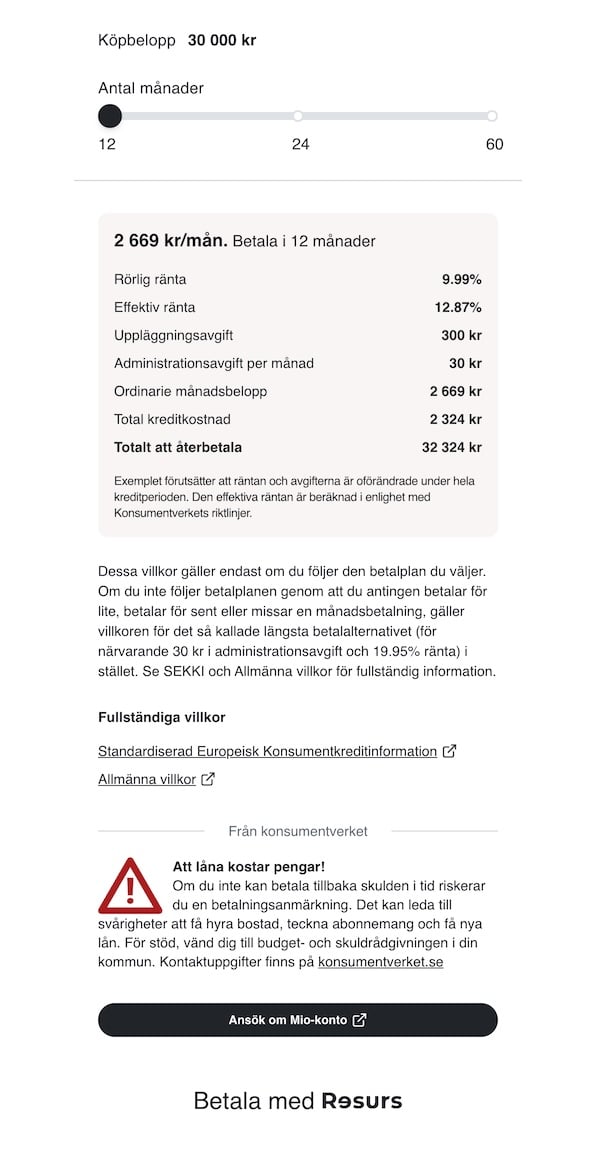 The PDP view shows the same pricing information but with a **fixed amount**
— the amount slider is hidden since the purchase amount is already
determined.
## Amount Limits
Each payment method defines minimum and maximum allowed amounts. If the `amount`
parameter is outside the allowed range, the page displays a warning and offers a
button to adjust to the nearest valid amount.
## Localization
The page automatically detects the store's country and sets the language
accordingly:
| Country | Language |
| ------------ | --------- |
| Sweden (SE) | Swedish |
| Norway (NO) | Norwegian |
| Finland (FI) | Finnish |
| Denmark (DK) | Danish |
English is available as a fallback language.
## Fetching Your Store ID and Payment Method IDs
To obtain your `storeId` and see which payment methods are available for your
store [refer to the Resurs Bank merchant API documentation](https://merchant-api.resurs.com/).
The PDP view shows the same pricing information but with a **fixed amount**
— the amount slider is hidden since the purchase amount is already
determined.
## Amount Limits
Each payment method defines minimum and maximum allowed amounts. If the `amount`
parameter is outside the allowed range, the page displays a warning and offers a
button to adjust to the nearest valid amount.
## Localization
The page automatically detects the store's country and sets the language
accordingly:
| Country | Language |
| ------------ | --------- |
| Sweden (SE) | Swedish |
| Norway (NO) | Norwegian |
| Finland (FI) | Finnish |
| Denmark (DK) | Danish |
English is available as a fallback language.
## Fetching Your Store ID and Payment Method IDs
To obtain your `storeId` and see which payment methods are available for your
store [refer to the Resurs Bank merchant API documentation](https://merchant-api.resurs.com/).